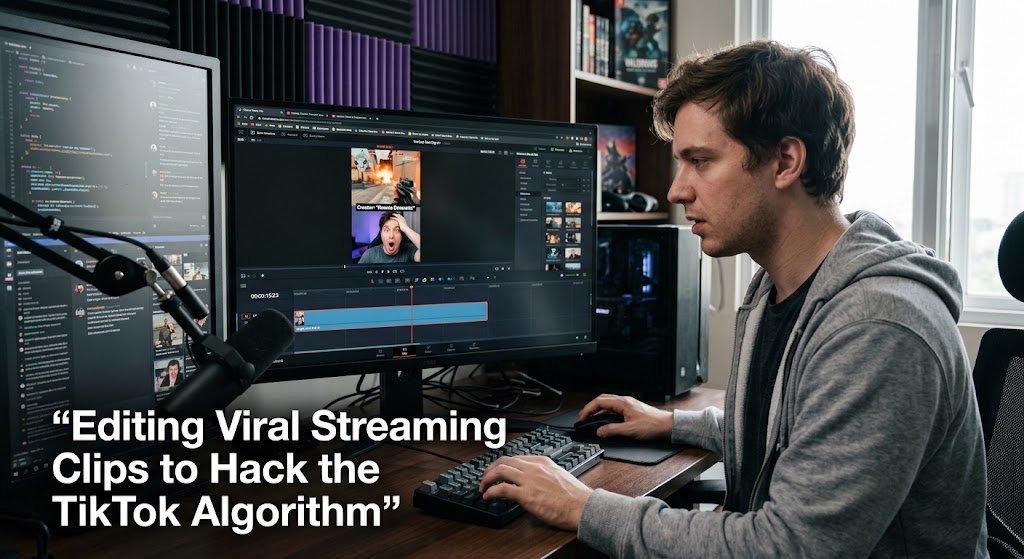
An eight-hour livestream can be almost worthless as a growth asset if its best moments stay buried inside the replay. Viral streaming clips turn that problem around by transforming one long broadcast into dozens of focused pieces that can reach viewers who never watched the original stream.
The idea isn’t to blindly chop everything into 15 seconds. It’s to find the moment with enough tension, humor, surprise, or skill to make someone stop scrolling. TikTok itself says its recommendation system considers signals including interactions, video information, and whether viewers finish watching longer videos.
That makes editing less about decoration and more about controlling attention.
1. Viral Streaming Clips Need Short Form Content With a Payoff From the First Seconds
The best clips usually have one thing in common. You can explain why they’re interesting in a single sentence.
A clutch gaming play. A ridiculous reaction. An unexpected interruption. A creator realizing they’ve made a huge mistake.
That’s the raw material.
Build the clip backward from the payoff
Don’t start by asking, “Where should I cut this?”
Ask, “What makes this moment worth watching?”
If the payoff happens at second 14, examine the five to eight seconds before it. Anything that doesn’t build anticipation, explain the situation, or strengthen the reaction is a candidate for removal.
A simple structure works well:
Context → tension → payoff → reaction
You don’t necessarily need all four, but the viewer should understand what is happening without watching the original stream.
Make the opening do actual work
A weak opening might show a streamer silently playing for three seconds.
A stronger opening could begin with:
“He had no idea the enemy was already behind him.”
Then immediately show the gameplay.
That’s a retention hook, not because the phrase itself is magical, but because it creates an information gap. The viewer wants to see whether the prediction is true.
TikTok has specifically noted that watch time is a recommendation signal and advises creators to capture attention early and maintain interest throughout the video.
Cut dead air without destroying the rhythm
Remove:
- long pauses
- repeated explanations
- loading screens
- irrelevant greetings
- unnecessary stream alerts
- sentences that don’t move the story forward
But don’t turn every frame into a jump cut. If every word is accompanied by a zoom, sound effect, or caption explosion, the viewer eventually notices the editing instead of the content.
Give every clip one job
One clip should ideally deliver one clear experience.
If a 90-second section contains a funny reaction, a gameplay highlight, and a separate argument, don’t force everything together.
Split it.
That creates more short form content from the same recording while keeping each upload focused.
2. Vertical Formatting Should Keep the Face and Gameplay Easy to Follow
A 16:9 livestream cannot simply be squeezed into a phone screen and expected to work.
The editor has to rebuild the composition.
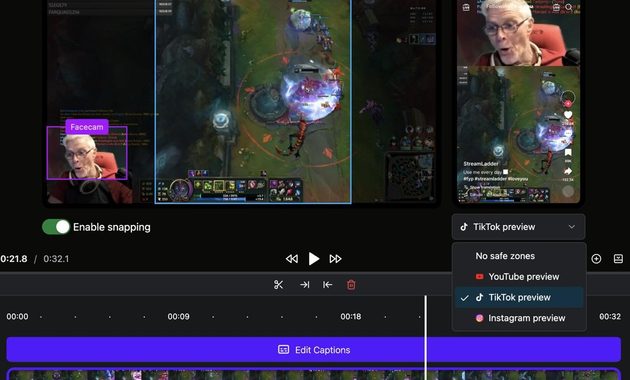
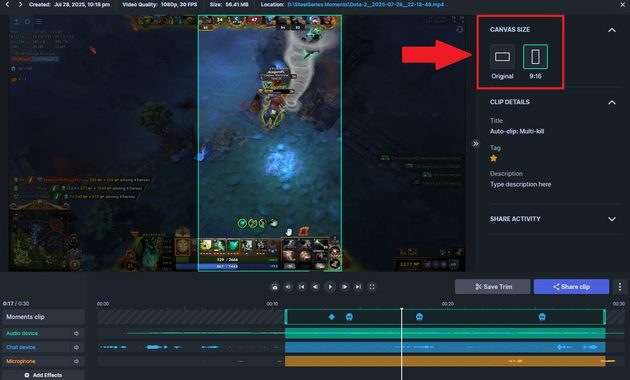
Start with a 9:16 frame
TikTok’s own creative guidance recommends vertical 9:16 production and warns creators to respect the platform’s interface safe areas.
For gaming footage, a practical layout is:
- Gameplay gets the largest visual area.
- The creator’s face remains visible when their reaction matters.
- Captions sit where interface elements won’t cover them.
- Important action stays close to the visual center.
Don’t automatically make the face huge. If the joke is happening inside the game, the gameplay deserves priority.
Follow the action instead of the center
Suppose the important character moves rapidly from the left side of the game to the right.
A static crop may leave the action partially outside the frame.
Use keyframes or automated tracking to move the crop with it.
The goal isn’t flashy editing. It’s making sure the viewer never has to hunt for the important thing.
Captions should add context
Compare these:
“NO WAY 😱🔥”
with:
“He just sold the final round.”
The second caption tells the viewer what matters.
Captions are particularly useful when the original livestream depends on context that a new viewer doesn’t have.
Protect the mobile viewing experience
Vertical formatting also means respecting UI space.
Keep important text away from the edges where platform controls may appear. TikTok’s published creative guidance specifically recommends considering safe zones so interface elements don’t cover important content.
The same principle applies beyond TikTok. YouTube currently supports square or vertical Shorts up to three minutes, so the same master edit can potentially be adapted for another major short-form destination.
For creators who need the actual clipping workflow first, this step-by-step guide to clipping a live stream fits naturally into the production process.
3. Retention Hooks Should Feed Cross Platform Growth Instead of Chasing One Algorithm
The mistake is treating TikTok as the destination rather than the distribution layer.
A strong clip can become a TikTok, YouTube Short, Instagram Reel, or another vertical asset. The core footage stays the same, but the packaging can change.
Don’t export one file and forget it
Create a clean master without platform-specific watermarks.
Then adjust:
- captions
- title text
- crop
- audio
- description
- call to action
This creates a more sustainable cross platform growth system than manually rebuilding every clip from scratch.
Measure the right signals
Raw views are useful, but they aren’t enough.
Watch:
- average watch time
- completion rate
- rewatches
- shares
- comments
- profile visits
- followers generated per clip
YouTube has also changed how Shorts views are counted since March 31, 2025. A view now counts when a Short starts or replays, while “Engaged views” remains available in Analytics to show viewers who chose to continue watching.
That distinction matters when comparing performance across uploads.
Don’t assume 15 seconds is a magic number
Fifteen seconds can be excellent for a punchline or quick gameplay moment.
It can also be far too short for a story that needs context.
The better rule is simple: stop when the viewer has received the payoff.
A 12-second clip that people replay can be more valuable than a rushed 30-second clip that loses them halfway through.
And remember, recommendation systems aren’t something an editor can “hack” with one secret trick. TikTok describes its feed as a ranking system built around multiple signals and personalized user interests.
The real advantage comes from producing consistently watchable material.
Turn one livestream into a content pipeline
A single broadcast might contain:
- three strong gameplay moments
- two funny reactions
- one controversial opinion
- several useful tips
- a memorable interaction with chat
That’s potentially a week or more of short-form material.
This is why viral streaming clips work best as a system rather than a one-off attempt at going viral.
Q&A
How long should a livestream clip be for TikTok?
There is no universal ideal length. Start with the shortest version that preserves the context and payoff, then compare retention and engagement against longer edits.
Should every clip show the creator’s face?
No. Show the face when the reaction adds emotional value. If the gameplay itself carries the moment, giving it more screen space can produce a cleaner viewing experience.
Is reposting the same clip across platforms a good strategy?
Yes, if the file is adapted rather than blindly duplicated. Remove platform-specific branding, check the crop, adjust captions, and make sure the audio and copyright status work for each destination.

Yun Seo-jun worked in online reputation monitoring for entertainment companies and consumer brands. His role involved tracking viral live moments, identifying misleading clips, documenting audience reactions, and preparing reports during digital controversies. He now writes about viral livestream cases, responsible content sharing, creator accountability, audience manipulation, and the ethical questions that often appear when a live broadcast spreads beyond its original audience.